CRM Implementation Timeline: 6-Month Roadmap for Enterprise SaaS Teams

Plan a successful CRM rollout with our realistic 6-month implementation roadmap. Covers data migration, configuration, training, launch, and optimization phases.
CRM Implementation Timeline: 6-Month Roadmap for Enterprise SaaS Teams
Introduction
You've finally decided to implement a CRM system. You've chosen your platform, signed the contract, and paid the first invoice. Now comes the hard part: actually implementing it.
Many companies underestimate CRM implementation. They think it's just about installing software, but it's actually a multi-month project involving data migration, process redesign, team training, and organizational change. Get implementation right, and you'll have a system that drives productivity and revenue for years. Get it wrong, and you'll have an abandoned tool collecting digital dust.
This guide provides a realistic 6-month implementation roadmap for enterprise SaaS teams. The timeline scales up or down based on complexity, but the phases remain the same.
Pre-Implementation Phase (Weeks -2 to 0)
Before launching your formal implementation, complete these preparatory steps.
Week -2: Form Your Implementation Team
Successful CRM implementation requires dedicated people working on it. Assemble a core team:
Project Manager: Owns timeline, budget, and stakeholder communication. Should have 10-15 hours/week availability.
CRM Administrator: Becomes the system expert. Configuration, troubleshooting, and user support. This person needs to learn the system deeply.
Business Analyst: Maps current processes and gathers requirements. Understands your business before translating it into CRM configuration.
Sales and Operations Representatives: Business users who understand how work actually happens (often different from how management thinks it happens).
IT/Technical Lead: Handles integrations, security, and infrastructure.
This isn't a part-time project. Assign people who can dedicate 15-20 hours/week minimum.
Week -1: Establish Goals and Success Metrics
What will success look like? Define specific, measurable goals:
- Adoption: 95% of salespeople logging activities weekly by Month 4
- Sales productivity: 20% increase in calls/emails per salesperson within 6 months
- Pipeline visibility and churn reduction: 100% of deals tracked in CRM within 30 days of implementation
- Reporting accuracy: 95% of forecasts match actual results
- Data quality: 90%+ of required fields populated accurately
Include ambitious but achievable metrics. These guide decision-making throughout implementation.
Week 0: Conduct Data Audit
Your CRM is only as good as your data. Before migrating, understand what you're working with:
- Inventory your data: Spreadsheets, email lists, databases, accounting systems—where does customer data live?
- Assess data quality:
- What % of records have email addresses?
- What % have phone numbers?
- How many duplicate records exist?
- How many records are incomplete or out-of-date?
- Identify data owners: Who maintains each data source? Spreadsheets especially tend to have tribal knowledge.
- Establish baseline metrics: Count your records, revenue, pipeline, etc. You'll compare post-implementation metrics against this baseline.
Most companies find their data is worse than expected. Incomplete fields, thousands of duplicates, and outdated records are common. Understanding this now prevents surprises later.
Phase 1: Discovery and Planning (Weeks 1-3)
Week 1: Process Mapping
Don't implement your CRM around old processes. Instead, understand current processes and improve them.
Sales Process Mapping:
- Map current pipeline stages (prospecting, qualification, proposal, negotiation, close)
- Define what activities occur at each stage
- Identify bottlenecks or delays
- Determine what success looks like at each stage
Example: Current sales process has 8 stages. Typical deal takes 4 months. Analysis shows most deals stall in "proposal" stage. CRM implementation should focus on identifying and addressing proposal stalls.
Customer Success Process:
- How are new customers onboarded?
- How often do you communicate with customers?
- What triggers support?
- How do you identify upsell opportunities?
Map these processes before CRM configuration. The CRM should support improved processes, not existing dysfunctional ones.
Week 2: Gather Requirements
Interview stakeholders to understand needs:
Sales leadership questions:
- What information do you need about prospects to make forecasts?
- What reports are critical for your decision-making?
- What activities should be tracked?
- How should leads be distributed?
- What's your ideal lead response time?
Salesperson questions:
- What's the minimum information you need about a prospect?
- How would improved CRM access change your day?
- What activities do you want tracked automatically?
- What would make your job easier?
Operations/Finance questions:
- What revenue data must be tracked?
- What reporting is needed for forecasting?
- What integrations are essential?
- What compliance requirements exist?
Document everything. Requirements should be specific and measurable.
Week 3: Design New Sales Process
Using your process maps and requirements, design an optimized sales process:
- Define your ideal pipeline: 5-8 stages with clear entry/exit criteria
- Identify key activities: What activities move deals forward?
- Set stage expectations: What should happen at each stage? How long should deals remain there?
- Create playbooks: Specific actions reps should take at each stage
Example improved process:
- Stage 1 - Prospect (Days 0-5): Discovery call scheduled
- Stage 2 - Qualified Lead (Days 5-30): Needs analysis complete, budget confirmed, timeline established
- Stage 3 - Proposal (Days 30-50): Proposal presented, questions answered
- Stage 4 - Negotiation (Days 50-70): Terms discussed, decision-maker confirmed
- Stage 5 - Closed Won (Day 70+): Contract signed, implementation scheduled
This clarity makes CRM configuration straightforward.
Phase 2: Data Migration (Weeks 4-6)
Week 4: Data Cleaning
Before migrating, clean your data:
- Identify and merge duplicates: Find records with same company/email. Merge and keep cleanest version.
- Standardize fields:
- Phone number format (all ###-###-####)
- Company name capitalization
- Country/state codes
- Date formatting
- Enrich missing data:
- Research high-value prospects missing phone numbers or emails
- Use data enrichment services for bulk missing data
- Set standards for what's mandatory (minimum email or phone per record)
- Remove invalid records:
- Dead email addresses (bounce detection)
- Records without actionable information
- Duplicate subscriptions
This is tedious work but absolutely critical. Dirty data in your CRM will cripple adoption.
Week 5: Build Data Mapping
Create a detailed map of where each data field goes:
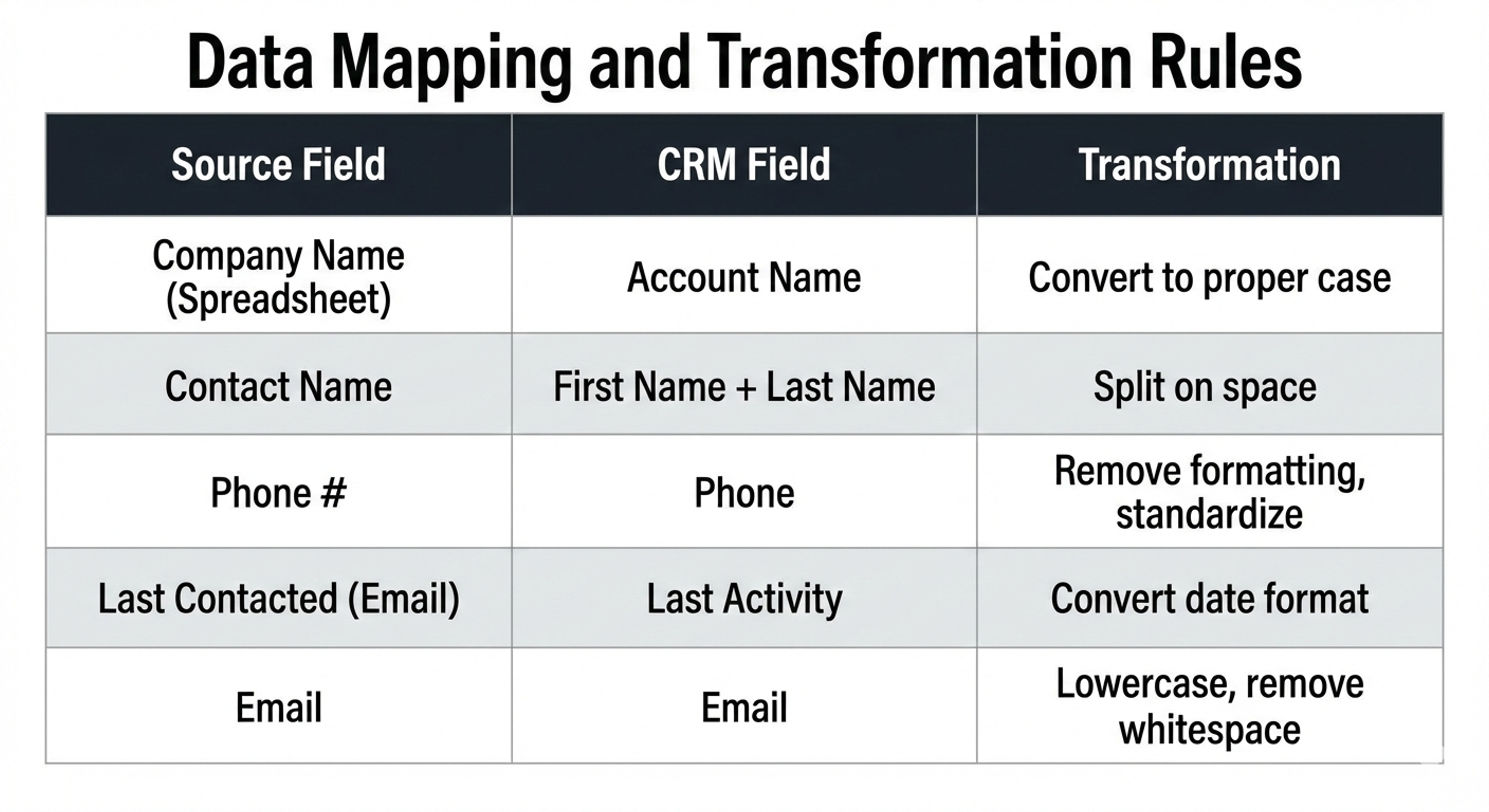
This mapping becomes your migration script reference.
Week 6: Execute Data Migration
- Test migration: Run a test migration to a sandbox CRM environment
- Validate results: Check record counts, spot-check data, verify formatting
- Adjust mapping: Fix any issues identified in testing
- Run final migration: Execute on production CRM
- Post-migration validation: Verify all records migrated correctly
- Create audit trail: Document what was migrated when
Common issues:
- Email addresses creating duplicates if system has strict deduplication
- Phone numbers formatted incorrectly for system validation
- Date fields interpreting dates in wrong format (US vs. European)
- Character encoding issues with special characters
Have your technical lead verify everything before declaring success.
Phase 3: Configuration and Customization (Weeks 7-10)
Week 7: Core Configuration
Configure your CRM's core features:
- User accounts: Create accounts for all users with appropriate permission levels
- Sales pipeline stages: Create stages matching your designed process
- Lead/account fields: Create all required fields for your business
- Custom objects: Create additional objects if needed (products, projects, etc.)
- Record types: Create different record types if you have distinct business processes
- Team/territory structure: Configure how teams and territories map to CRM
Week 8-9: Automation Setup
Build automations that make the CRM valuable. This includes both sales automations and email marketing automations integrated with your CRM for holistic lead nurturing and automation
Lead assignment automation:
- New leads automatically assign to salespeople based on territory/industry
- Round-robin assignment prevents one rep getting all leads
- VIP accounts automatically assign to senior reps
Activity tracking automation:
- Emails sent from CRM automatically log to account record
- Meeting notes automatically attach to related records
- Outlook/Gmail integration logs emails without manual action
Workflow automation:
- When deal reaches "proposal" stage, automatically create task to follow up in 7 days
- When deal closes, automatically move to customer success queue
- When customer hasn't been contacted in 90 days, flag for review
Approval workflows (if needed):
- Discounts above certain value require manager approval
- Large deals require director approval before closing
- Pricing overrides require CFO approval
Start with essential automations. You can add more sophisticated ones post-launch.
Week 10: Reporting and Dashboard Setup
Set up reports and dashboards that will drive decisions:
Sales leadership dashboard:
- Pipeline value by stage
- Win rate by salesperson
- Average deal size and sales cycle
- Revenue forecast vs. target
- New vs. existing customer revenue
Salesperson dashboard:
- My pipeline and next actions
- My activities this week
- Deals at risk (overdue)
- My target vs. progress
Operations dashboard:
- Company pipeline and forecast
- Churn risk indicators
- Customer acquisition cost trends
- Expansion revenue opportunities
These should update daily and be accessible at a glance.
Phase 4: Integration and Testing (Weeks 11-13)
Week 11: Integration Setup
Connect your CRM to other business systems:
Email integration:
- Outlook/Gmail integration for email logging
- Test that emails sync bidirectionally
- Verify contacts/companies auto-populate
- Email marketing software integration is critical
- Understand both CRM vs. email marketing tools and email automation workflows for proper integration
- Test that emails sync bidirectionally
Accounting integration:
- Sync customer and revenue data to accounting system
- Test invoice-to-deal matching
- Verify revenue recognition
Marketing automation integration:
- Sync email list to CRM
- Integrate lead scoring with CRM
- Test that hot leads auto-assign to sales
Support/customer success integration:
- Sync support tickets to CRM
- Link customer interactions across channels
- Verify service requests create CRM tasks
Test each integration thoroughly. Failed integrations will break trust in the CRM.
Week 12: User Acceptance Testing (UAT)
Have actual users test the system:
- Create test scenarios: "Create a new lead, move through pipeline, close deal"
- Have different user types test: Reps, managers, admins, finance
- Document issues: Every problem reported
- Fix issues: Prioritize by severity and impact
- Re-test fixes: Verify fixes work
Common issues found in UAT:
- Fields or workflows don't work as expected
- Performance slow during peak usage
- Reports don't include all needed data
- Mobile app missing features
Week 13: Security and Compliance Review
Before go-live:
- Security audit: Verify user permissions, data encryption, API security
- Compliance check: Ensure GDPR, SOC2, or industry requirements met
- Backup procedures: Verify daily backups working
- Disaster recovery: Verify backup and recovery procedures
- Data ownership: Clarify who owns what data and can access
Document all security and compliance measures for your records.
Phase 5: Training (Weeks 14-16)
Week 14: Training Program Design
Create a tiered training program:
Executive briefing (30 minutes):
- Business benefits of CRM
- Key metrics they'll see in dashboards
- Expected productivity improvements
Manager training (2 hours):
- How to use CRM for forecasting and reporting
- How to manage and coach reps using CRM
- How to identify pipeline problems
Sales rep training (4 hours):
- System navigation and daily tasks
- How to create accounts, leads, and deals
- How to log activities and update records
- Best practices for CRM usage
Administrator training (8+ hours):
- Complete system configuration
- User management and permissions
- Troubleshooting and support procedures
- Customization and updates
Week 15: Conduct Training
Run training sessions:
- Group training: Core functionality in group sessions
- Hands-on practice: Let people practice with real data
- One-on-one coaching: Help struggling individuals
- Training documentation: Create guides/videos for ongoing reference
- FAQ resource: Compile common questions and answers
Train managers first and heavily—they'll be coaching their teams post-launch.
Week 16: Launch Readiness
- Communications: Executives and team understand why CRM matters
- Support plan: Know how to get help (chat, email, phone, documentation)
- Go-live checklist: Everything is tested and ready
- First week plan: Extra support available day 1
- Success metrics: Team knows what success looks like
Phase 6: Launch and Optimization (Weeks 17-26)
Week 17: Go-Live
Day 1 of go-live:
- Monitor system closely: Watch for errors, slowness, issues
- Provide support: Have team available to help on chat/phone
- Communicate progress: Send daily updates to leadership
- Document issues: Create list of bugs/problems for fixing
First week post-launch:
- Daily check-ins: Quick standup with team to address blockers
- Monitor adoption: Check that people are actually using system
- Fix quick issues: Address problems immediately
- Celebrate wins: Highlight positive usage examples
Weeks 18-20: Adoption Phase
This is where many implementations fail. Users revert to old ways. Your job is preventing that. Focus on early wins like automating email workflows and tracking retention metrics to show value. Users revert to old ways. Your job is preventing that:
- Monitor usage: Track who's logging in, updating records, using system
- Identify resisters: Who isn't using CRM? What's the blocker?
- Provide targeted support: Extra help for struggling users
- Share quick wins: Highlight reps who found value early
- Celebrate early success: Deals closed, forecasts accurate, etc.
Expect adoption curve:
- Week 1-2: Honeymoon phase, people try system
- Week 3-4: Reality sets in, effort required becomes apparent, some resistance
- Week 5-6: Committed users see value, skeptics still resisting
- Week 7-8: Majority adopted, stragglers remaining
Weeks 21-26: Optimization and Adjustment
After 4-6 weeks of usage, analyze what's working and what isn't:
- Usage analysis: Which features are used? Which are ignored?
- Adoption metrics: What % of team is using CRM regularly?
- Feedback collection: What pain points exist?
- Identify improvements: Which configurations, reports, automations need adjustment?
- Iterate: Adjust the system based on real-world usage
Make continuous small improvements. Add new automations, adjust fields, improve reports. This keeps momentum going.
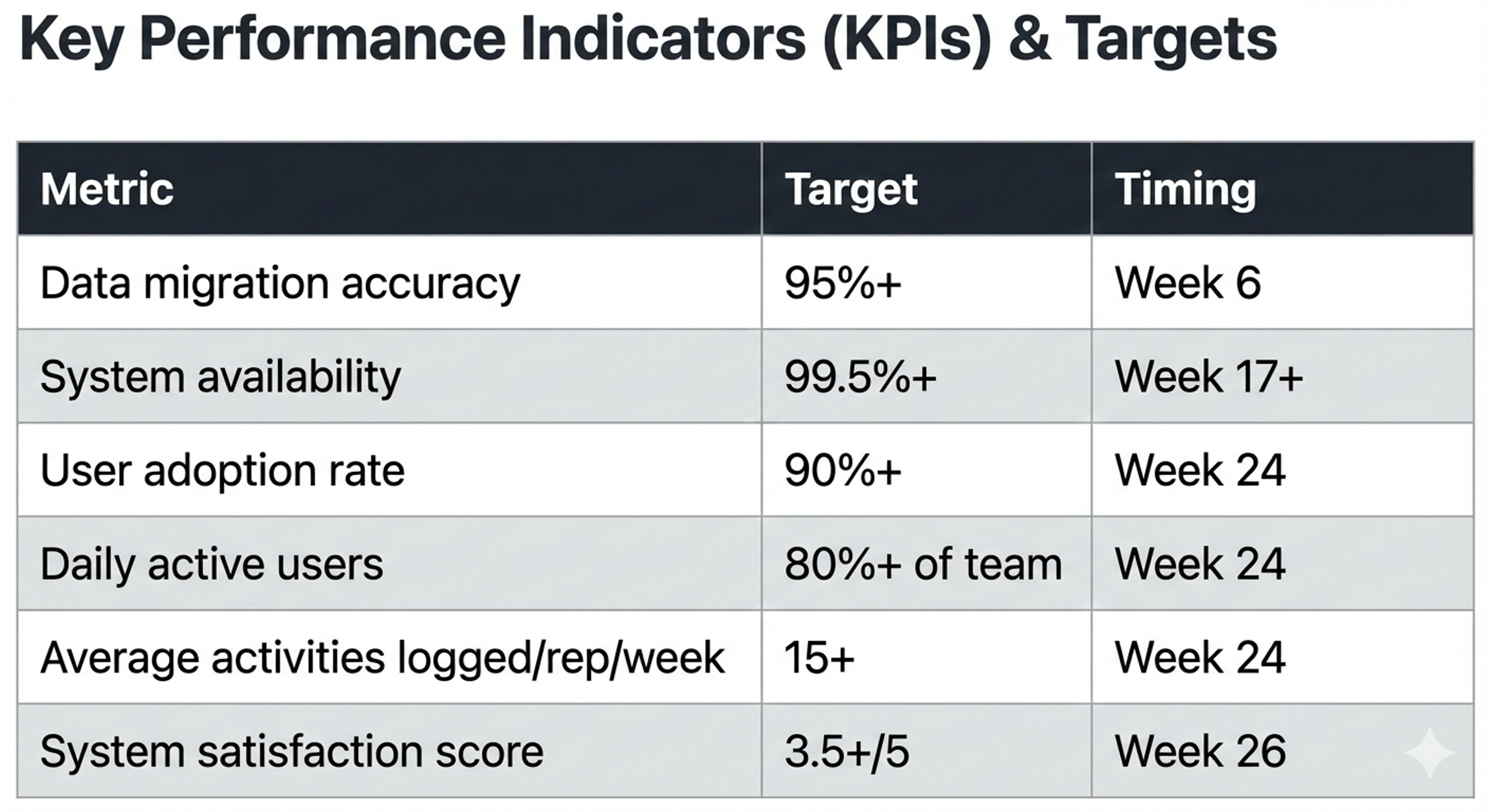
Key Implementation Metrics
Track these throughout implementation:
Common Implementation Mistakes
Mistake 1: Underestimating Data Cleanup
Most companies spend only 1-2 weeks cleaning data. Industry standard is 3-4 weeks. Poor data quality causes adoption problems.
Mistake 2: Skipping Process Redesign
Implementing CRM around old processes just digitizes bad processes. Use CRM implementation to improve how you work.
Mistake 3: Insufficient Training
One 2-hour training isn't enough. Most people need 4-6 hours of training plus ongoing support. Budget for multiple training sessions.
Mistake 4: Launching Without Manager Buy-In
If managers don't use CRM, their reps won't either. Get managers excited and trained thoroughly.
Mistake 5: Declaring Victory Too Early
Many projects stop support at month 2. Adoption happens over months 2-4. Stay committed to full 6-month timeline.
Mistake 6: Not Communicating Clearly
People resist change when they don't understand why. Over-communicate about CRM benefits, changes, and what's expected.
Post-Implementation: Year 1 and Beyond
CRM implementation doesn't end at month 6. Plan for ongoing evolution:
Months 6-12:
- Monitor adoption closely
- Add advanced email marketing automations based on feedback
- Expand integrations with email marketing and other tools
- Implement customer retention tracking and churn prevention
Year 2+:
- Continuous optimization based on usage data
- Leverage CRM data for strategic decisions
- Expand use cases (customer success, marketing)
- Plan major upgrades or migrations as business needs change
Conclusion
CRM implementation is a 6-month intensive project requiring dedicated resources and clear planning. The payoff is substantial—properly implemented, a CRM drives 20-30% productivity improvements, 15-20% revenue increases, and dramatic improvements in visibility and forecasting accuracy.
Use this roadmap to guide your implementation. Adjust timelines based on your complexity, team size, and organizational factors. But don't skip phases or rush critical steps like data cleaning and training.
The difference between successful implementations and failures often comes down to commitment and discipline—following a plan, staying focused, and supporting adoption through the difficult middle phase.
About the writer

Founder & Writer · EveryTuesdays
You May Also Like
Browse All
SaaS Customer Retention Metrics: How to Reduce Churn Using CRM Data
Reduce SaaS churn and increase profitability. Learn critical retention metrics (churn rate, LTV, NRR), predict at-risk customers, and use CRM data for retention strategies.
Email Marketing Automation 101: How to Set Up Workflows in Your CRM
Set up powerful email automation workflows that run 24/7. Learn welcome sequences, drip campaigns, lead nurturing, and how to automate your email marketing in your CRM.

CRM vs. Email Marketing Software: When to Use Each & How to Integrate
Confused about CRM vs. email marketing software? Most companies need both. Learn when to use each system, how they differ, and how to integrate them for maximum ROI.