Blog SEO Optimization: The Complete Beginner's Guide to Ranking on Google (USA 2026)
Learn blog SEO optimization step by step. This guide covers title tags, keyword placement, internal linking and US ranking tips for beginner bloggers
SEO Sounds Complicated. It Really Is Not. Here Is Why.
Let's get something out of the way immediately: SEO — Search Engine Optimization — is not a secret code that only technical people can crack. It is not about tricking Google. And it is definitely not something you need an agency or specialist to handle for a beginner blog.
Here is the plain-English version of what SEO actually is: it is the practice of writing and structuring your content in a way that Google can understand, trust, and match to the right searches. That is it.
For on-page SEO for blogs beginners, most of what actually moves the needle is surprisingly straightforward — using the right words in the right places, organising your articles clearly with proper headings, and linking your pages to each other in a logical way. No coding. No technical wizardry.
What Google actually wants — and this comes directly from Google's own published guidance — is content that is helpful, written for real people, and easy to understand. A beginner blogger who writes genuinely useful articles in plain English and follows the basics in this guide will outrank a blogger who stuffs keywords everywhere but writes content nobody actually wants to read.
⚡ What This Guide Covers
- Part 1 — Title tags: why this is your most important SEO element
- Part 2 — Meta descriptions: how to write the Google "ad" for your article
- Part 3 — Heading structure: H1, H2, H3 and how to use them correctly
- Part 4 — Keyword placement: the exact spots where your keyword needs to appear
- Part 5 — Internal linking: the free SEO move most beginners completely ignore
- Part 6 — US-specific SEO: how to tell Google your content is for American readers
- Part 7 — Technical SEO basics: the one-time setup that protects your rankings
- Part 8 — Free SEO tools: what to use and when
- FAQ — common SEO questions answered in plain English
Part 1 — Title Tags: Your Single Most Important SEO Element
The title tag is the first thing both Google and your reader see. It is the blue clickable text in Google search results. It is also the H1 heading at the top of your article. Getting this right has more positive impact on your rankings than almost any other single change you can make.
Google uses your title tag to understand what your article is about and decide which searches it should appear for. Your reader uses it to decide whether to click. Both of those outcomes depend entirely on how well you write it.
The Rules for a Title Tag That Ranks AND Gets Clicked
- Put your main keyword near the beginning — ideally in the first 4–5 words. Google gives more weight to words at the start of the title.
- Keep it under 60 characters — anything longer gets cut off in search results with "..." which looks unprofessional and hurts click-through rates.
- Add a power modifier — words like "Complete", "Beginner Guide", "2026", "Step-by-Step", or "For Americans" increase click rates because they signal value and relevance.
- Never stuff keywords — "Blog SEO Optimization SEO Tips SEO Guide SEO 2026" looks like spam to both Google and readers. Use your keyword once, naturally.
- Include a US signal when relevant — "for US Bloggers", "in the USA", or "for Americans" tells Google this content is geographically targeted.
❌ BAD - How I Do SEO on My Blog (Some Tips and Tricks)
✅ GOOD - Blog SEO Optimization: Complete Beginner's Guide to Ranking (2026)
❌ BAD - SEO Tips for Blogs and Websites and Content Marketing Strategies
✅ GOOD - On-Page SEO for Blogs: 10 Things to Fix Before You Hit Publish
❌ BAD - My Ultimate Guide to Search Engine Optimization for New Bloggers USA
✅ GOOD - WordPress SEO for Beginners (USA 2026): Rank Your Blog on Google
💡 Where to Set Your Title Tag in WordPress
In Rank Math: Look for the Rank Math panel below your article editor. Click "Edit Snippet". The SEO Title field is where you type your title tag.
In Yoast: Scroll down to the Yoast panel. Click "Edit snippet". Type in the SEO title field.
Important: your WordPress post title and your SEO title can be different. Your post title is the H1 on the page. Your SEO title is what appears in Google. Both should include your keyword — but the SEO title has the 60-character limit.
Part 2 — Meta Descriptions: Your Two-Sentence Google Ad
The meta description is the short paragraph that appears below your title in Google search results. Google does not use it as a direct ranking factor — but it massively affects how many people click your article. And in SEO, click-through rate matters.
Meta descriptions for blogs — how to write them: think of it as a two-sentence advertisement. Your only job is to make the reader stop scrolling and think: "Yes — this is exactly what I was looking for."
The Formula for a Meta Description That Gets Clicks
- Length: 150–160 characters — any longer and Google truncates it, cutting off your message mid-sentence.
- Include your primary keyword once — naturally, not forced. Google bolds it in the search result when it matches what the user searched for, making your result stand out visually.
- Include a soft call to action: "Learn how...", "Discover...", "Find out exactly..." — these signal that reading further will reward the user.
- Write for the human, not the algorithm — describe the benefit the reader gets, not just what the article contains.
- Include a US signal if your content is US-targeted — "for US bloggers", "in the USA", "for Americans" — this helps with both CTR and geographic relevance.
❌ BAD - This article is about SEO for blogs and covers many SEO tips and tricks.
✅ GOOD - Learn how to optimize your blog for Google — SEO guide for US beginners covering title tags, keywords, and ranking strategy.
❌ BAD - SEO optimization blog post tips for beginners in 2026 learn here.
✅ GOOD - Struggling to rank on Google? This step-by-step blog SEO guide shows US beginners exactly what to fix — no technical knowledge needed.
Where to add it in WordPress: in the Rank Math or Yoast panel below your article editor — look for "Meta Description" or "Edit Snippet". It does not appear on your page, only in Google.
Part 3 — Heading Structure: H1, H2, H3 and Why They Matter
Heading tags SEO for bloggers is one of those topics that sounds more complicated than it really is. Headings do two simple jobs: they make your article easy to scan for human readers (which keeps them on your page longer), and they tell Google exactly what each section of your article is about.
Google reads your headings to understand the structure and topic scope of your content. If your headings are clear, keyword-relevant, and well-organised, Google can match your article to a wider range of related searches — which means more traffic.
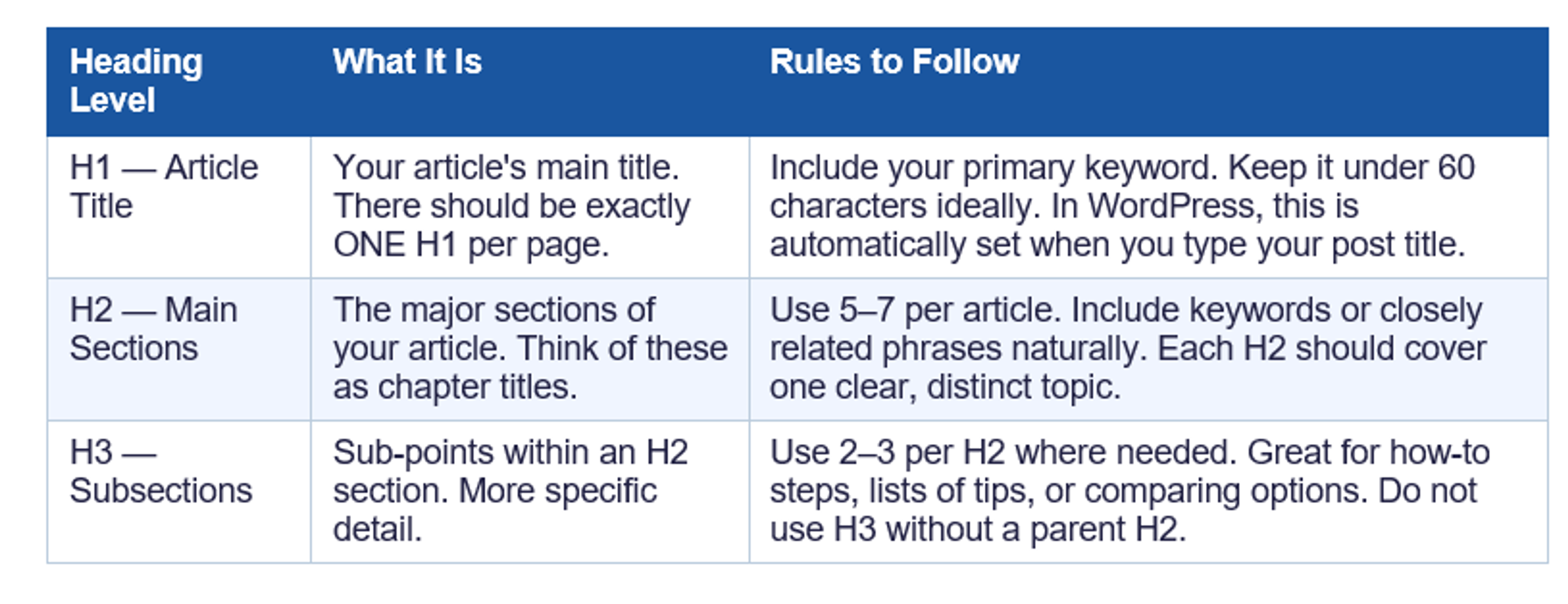
In WordPress: highlight any text and click the "Paragraph" dropdown in the toolbar. Change it to Heading 2 or Heading 3. That is all there is to it.
⚠️ The Heading Mistakes That Hurt Your SEO
- Using H2s for everything — even when some sections should be H3 subsections. Structure matters.
- Putting your keyword in every single heading. Natural placement only — one or two H2s with keywords is fine.
- Using headings just to make text look bigger. Only use headings for actual sections and subsections.
- Skipping straight from H1 to H3. Always go H1 → H2 → H3 in order. Google notices the structure.
Part 4 — Keyword Placement: The Exact Spots Your Keyword Needs to Appear
This is how to optimize blog posts for SEO step by step — specifically, where to actually place your primary keyword so Google connects your article with the right searches. Most beginners either under-place (too few mentions, Google does not register the topic) or over-place (keyword stuffing, which Google penalises).
The goal is to place your keyword enough times that Google understands what the article is about, but not so many times that it sounds unnatural when read out loud. If you can read your article aloud and the keyword placement sounds completely normal — you have done it right.
The 7 Places Your Keyword Must Appear
- In your H1 title — ideally in the first 4–5 words. "Blog SEO Optimization Guide..." beats "A Complete Guide to Blog SEO Optimization..."
- In the first 100 words of your intro — Google reads your opening paragraph closely. Your keyword should appear naturally within the first 2–3 sentences.
- In at least one H2 heading — somewhere in your main section headings, not every one, but at least one.
- Naturally throughout the body — roughly every 300–400 words is natural. Aim for keyword density of 0.5–1.5% of total word count.
- In your conclusion or final paragraph — a natural recap that includes your keyword signals completeness to Google.
- In your meta description — Google bolds it in search results when it matches the searcher's query, making your result stand out.
- In the alt text of your main image — Google cannot see images, only the text description. Use your keyword naturally: "blog seo optimization checklist for beginners 2026".
💡 LSI Keywords — What They Are and Why They Matter
- LSI stands for Latent Semantic Indexing — which basically means "related words and phrases".
- Google does not just look for your exact keyword. It looks for related terms that confirm what your article is about.
- For "blog SEO optimization": related terms include "search rankings", "Google traffic", "meta tags", "on-page SEO", "keyword density".
- Use these naturally throughout your article. They help Google understand the full scope of your topic — and they help you rank for related searches you did not even target directly.
- Find them by: scrolling to the bottom of a Google results page and looking at "Related Searches", or using the free Ubersuggest keyword ideas feature.
What to avoid: do not repeat the keyword so many times that it sounds robotic when read out loud. If you have to force the keyword into a sentence, leave it out and use a natural variation instead. Google is sophisticated enough to understand context — it does not need exact-match repetition anymore.
Part 5 — Internal Linking: The Free SEO Move Most Beginners Ignore
Internal linking means adding links from one article on your blog to another article on your blog. This is genuinely one of the most powerful SEO actions a beginner can take — and it is completely free — yet most new bloggers either do it randomly or not at all.
The internal linking strategy blog SEO works on two levels. First: when you link Article A to Article B, you are telling Google that these two pages are related and that one supports the other. Second: you are passing what SEO professionals call "link juice" — a portion of your article's authority — from one page to another. Over time, this creates a web of interconnected content that Google trusts significantly more than isolated, standalone pages.
Think about it from Google's perspective: a blog where every article links to related articles looks like an expert resource. A blog where every article is an island with no connections looks thin and untrustworthy. Google ranks the resource, not the island.
How to Do Internal Linking the Right Way
- Aim for 3–5 internal links per article minimum — spread throughout the article where they naturally fit, not all in one place.
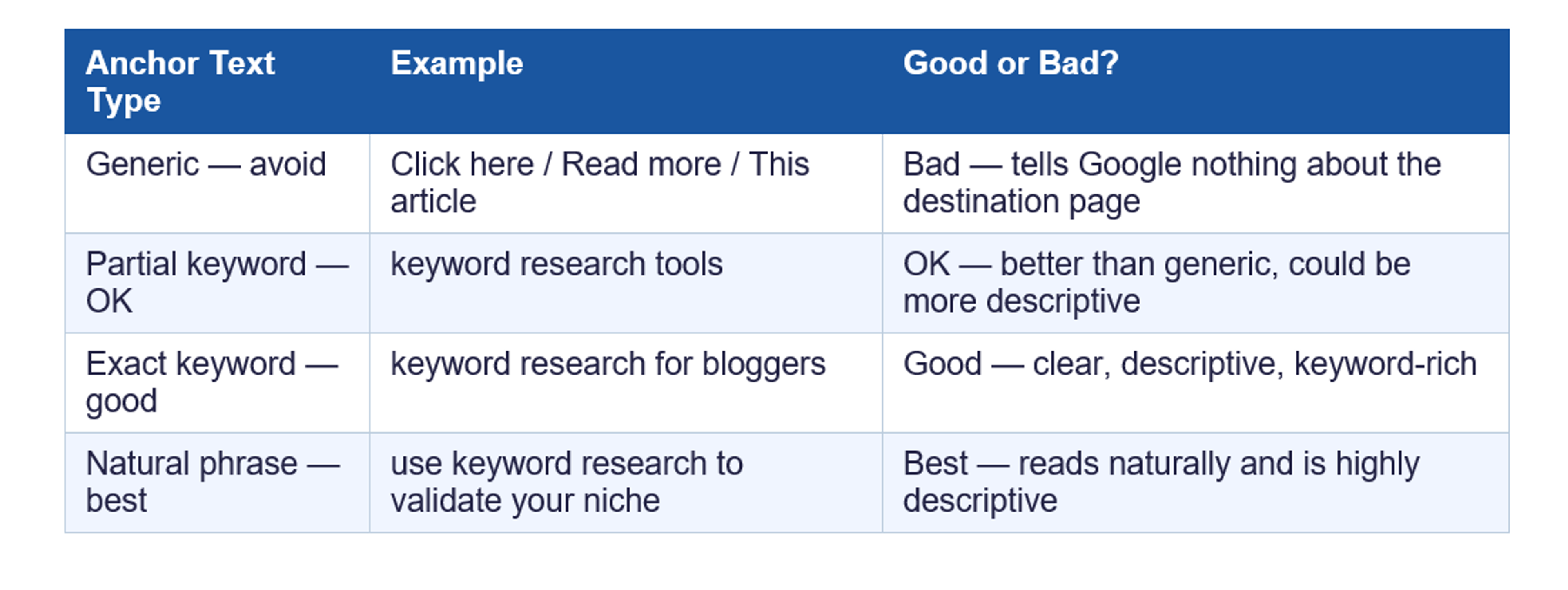
- Use descriptive anchor text — the clickable text of a link should describe what the reader will find. "keyword research for bloggers" is good. "click here" or "read more" tells Google nothing.
- Link to your Pillar Article from every cluster article — your main hub article should be the most linked-to page on your site.
- Link to related cluster articles where it genuinely helps the reader — if you mention keyword research while explaining SEO, link to your keyword research article.
- Link newer articles to older ones as well — passing authority to older content that needs a rankings boost.
- Do not add links just to add links — only link when it genuinely serves the reader. Forced links hurt user experience and Google notices.
Part 6 — US-Specific SEO: How to Tell Google This Content Is for Americans
If your target audience is in the United States — and it should be, given that US traffic earns the highest ad RPMs and converts best on US affiliate programs — there are specific SEO steps that tell Google to show your content to American searchers preferentially. Most beginner blogging guides skip this section entirely. Do not.
WordPress SEO optimization for beginners specifically for US audiences involves both on-page signals and technical settings that compound your geographic relevance over time.
On-Page US SEO Signals
- Set your site language to English (United States) — go to WordPress Settings → General → Site Language → English (United States).
- Use US spelling throughout — "organize" not "organise", "color" not "colour", "center" not "centre". Google uses spelling patterns as geographic signals.
- Include US-specific keyword modifiers in your content: "in the USA", "for Americans", "US-based", "2026 US". Even one geo-modifier per article makes a difference over hundreds of articles.
- Reference US platforms and prices in USD — mention Bluehost, Amazon.com, ConvertKit's USD pricing. Google reads these as geographic signals.
- Cite US-specific statistics — data from Pew Research, Statista US, Forbes, or US government sources signals that your content is research-based and US-focused.
Technical US GEO Settings
- In Google Search Console: go to Settings → International Targeting → Country tab → select United States. This explicitly tells Google your primary geographic target is the US.
- Use US-based hosting servers — Bluehost and SiteGround both have US data centers. Closer server location = faster load times for US visitors = better Core Web Vitals scores for US search.
- Hreflang is not needed for US-only blogs — hreflang tags are for multi-language sites. If your blog is English-only targeting the US, you do not need them.
🇺🇸 Why US Targeting Changes Your Income Potential
- US Google traffic earns $5–$15 RPM from display ads. International traffic often earns $0.50–$3 RPM.
- US affiliate programs (Amazon Associates US, Bluehost, ConvertKit) pay significantly more than their international equivalents.
- US readers convert on affiliate links at higher rates — they are more accustomed to buying online based on recommendations.
- A blog with 10,000 monthly US visitors often earns 3–5x more than the same blog with 10,000 mixed international visitors.
- GEO targeting is not just an SEO move — it is a direct income optimisation strategy.
Part 7 — Technical SEO Basics: Do These Once, Benefit Forever
You do not need to be technical to handle these. They are one-time tasks that take less than an hour combined and protect your blog's SEO foundation permanently. Page speed optimization for WordPress blogs is the most important one — so we start there.
1. Page Speed — Google's Most Underestimated Ranking Factor
Google measures page speed as part of its Core Web Vitals — a set of user experience metrics that directly affect search rankings. A blog that loads in under 3 seconds gets a significant ranking advantage over a slow one. For US visitors specifically, page speed is especially important because American users have high expectations and high bounce rates on slow sites.
- Use the free Google PageSpeed Insights tool (pagespeed.web.dev) to test your blog — aim for a score above 90 on mobile.
- Install WP Super Cache (free WordPress plugin) — this creates static versions of your pages that load significantly faster for returning visitors.
- Compress your images before uploading — use TinyPNG.com (free) to reduce image file sizes by 60–80% without visible quality loss.
- Avoid heavy page builder plugins — Elementor, Divi, and similar tools add significant page weight. Stick to a lightweight theme like GeneratePress or Astra.
2. SSL Certificate — Required for Google Rankings
Every website needs an SSL certificate — that is what puts "https://" at the start of your URL and the padlock icon in browsers. Google has confirmed it uses SSL as a ranking signal. Without it, your blog can trigger browser security warnings that drive visitors away immediately.
The good news: every Bluehost and SiteGround hosting plan includes a free SSL certificate that activates automatically. You do not need to do anything. Just log in, check that your URL starts with https://, and you are set.
3. XML Sitemap — Tell Google About Every Article
An XML sitemap is a file that lists every page and article on your blog in a format Google can read. It helps Google discover and index your content faster — especially important for new blogs that have not yet built many incoming links.
- Rank Math automatically generates your sitemap at yourdomain.com/sitemap_index.xml
- Submit it to Google Search Console: Sitemaps → enter sitemap_index.xml → click Submit
- When you publish a new article, go to URL Inspection in Search Console → paste the URL → click Request Indexing — this tells Google to crawl your new content immediately
4. Mobile Optimisation — Over 60% of US Google Searches Happen on Phones
Google uses mobile-first indexing, which means it primarily uses the mobile version of your site to determine rankings — even for desktop searches. If your blog looks or loads poorly on a phone, your rankings suffer across all devices.
- Both GeneratePress and Astra themes are mobile-responsive by default — no extra setup needed.
- Test your blog on your own phone after every major design change.
- Use Google Search Console's Mobile Usability report to catch any mobile-specific issues.
Part 8 — Free SEO Tools for Bloggers: What to Use and When
SEO tools for bloggers — free options: the most important SEO tools available to you are completely free. Here is what to use and exactly when to use each one:
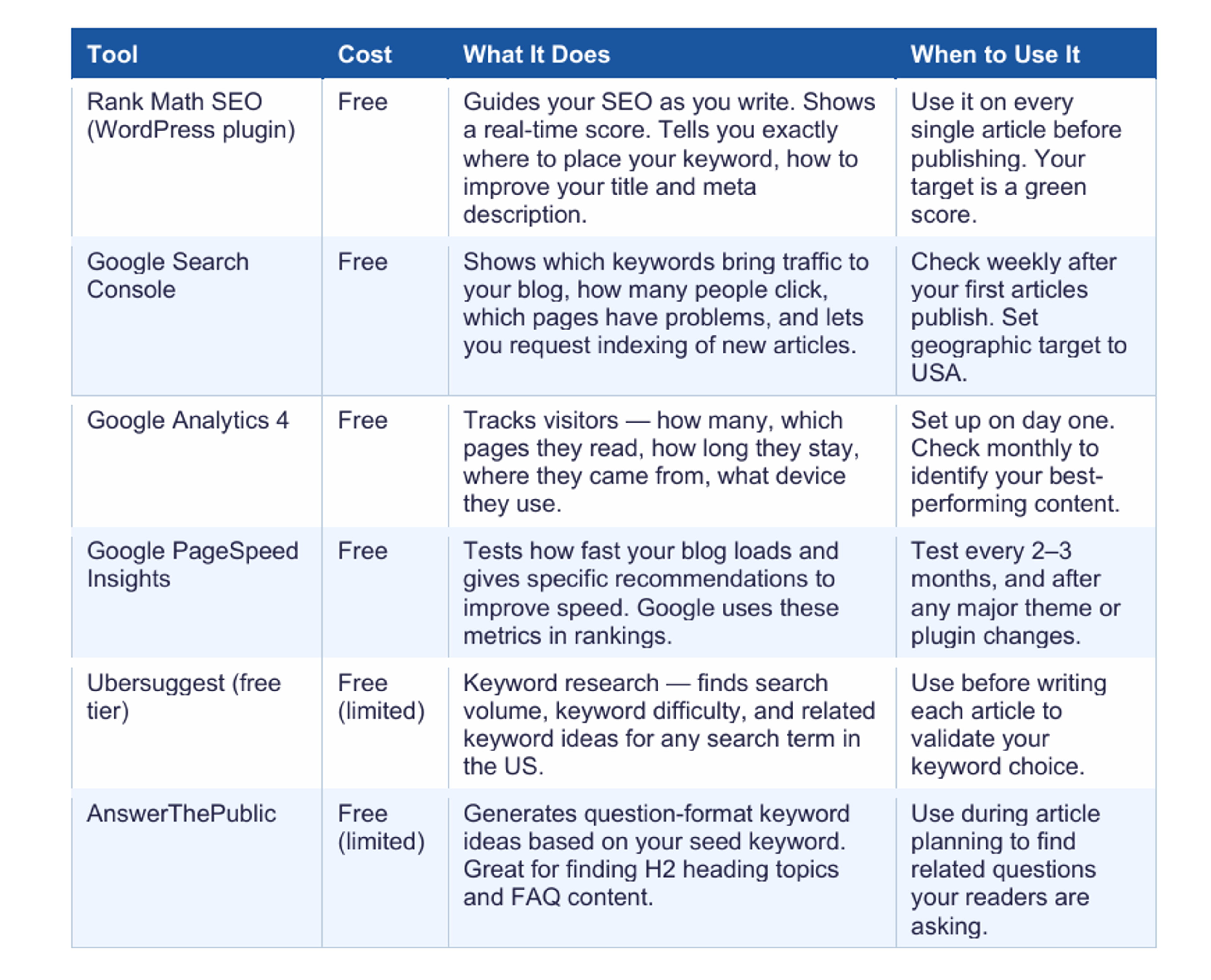
Do you need paid tools? Not yet. The free tools above are enough to build and grow a successful blog to $500–$1,000/month. Once you are earning consistently, consider adding Ahrefs or SEMrush for deeper keyword research and competitive analysis — but only when the investment makes sense relative to your income.
Your Complete Blog SEO Checklist — Check Every Box Before Publishing
This is your SEO checklist for blog posts — run through every item before you hit publish on any article.
✅ Pre-Publish SEO Checklist
KEYWORD PLACEMENT
- ☐ Primary keyword in H1 title (first 4–5 words ideally)
- ☐ Primary keyword in first 100 words of intro
- ☐ Primary keyword in at least one H2 heading
- ☐ Primary keyword appears naturally every 300–400 words throughout
- ☐ Primary keyword in conclusion paragraph
- ☐ Primary keyword in meta description
- ☐ Primary keyword in featured image alt text
TITLE & META
- ☐ SEO title is under 60 characters
- ☐ SEO title includes a power modifier (Complete, Beginner Guide, 2026, USA)
- ☐ Meta description is 150–160 characters
- ☐ Meta description includes keyword + benefit + soft CTA
STRUCTURE
- ☐ Article has one H1 (auto-set as post title in WordPress)
- ☐ Article has 5–7 H2 sections covering the main topics
- ☐ H3 subsections used where needed (never H3 without an H2 parent)
- ☐ Paragraphs are short — 2–4 sentences maximum
LINKS
- ☐ 3–5 internal links added — to Pillar Article and related clusters
- ☐ All anchor text is descriptive (no "click here" or "read more")
- ☐ 2–3 external links to credible US sources
IMAGES
- ☐ At least one image per 400 words
- ☐ All images have keyword-relevant alt text
- ☐ Images compressed before uploading (TinyPNG)
TECHNICAL
- ☐ Rank Math score is green (or at minimum amber)
- ☐ URL slug is short and keyword-only (no stop words)
- ☐ Category and tags selected
- ☐ FTC disclosure at top if any affiliate links present
- ☐ Article reads well on mobile
POST-PUBLISH
- ☐ URL submitted to Google Search Console (URL Inspection → Request Indexing)
- ☐ Older related articles updated with a link to this new article
Frequently Asked Questions — Blog SEO for Beginners
What is on-page SEO for blogs and why does it matter?
On-page SEO refers to everything you do on your individual articles to help them rank — title tags, keyword placement, heading structure, meta descriptions, image alt text, and internal linking. It is called "on-page" to distinguish it from "off-page" SEO (like backlinks from other sites). For a beginner blogger, on-page SEO is where you should focus 90% of your effort, because it is entirely within your control and produces measurable results within weeks.
How long does it take for SEO to work on a new blog?
Honestly — longer than most guides admit. New blogs typically start seeing their first organic Google traffic at around 3–6 months after consistent publishing. Meaningful traffic (enough to generate real income) usually takes 9–12 months. This is not a failure — it is how Google works. It takes time to build domain authority. Every article you publish is a long-term asset. The bloggers earning $2,000/month today published their first articles to near-zero traffic 12–18 months ago.
Do I need to pay for SEO tools to rank my blog?
No — not at the beginning. Rank Math (free), Google Search Console (free), Google Analytics (free), Google PageSpeed Insights (free), and Ubersuggest (free tier) are more than enough to build and optimise a blog to $500–$1,000/month. Paid tools like Ahrefs or SEMrush become valuable once you are ready to do serious competitive keyword research and backlink analysis — typically after 12+ months of blogging. Start free. Invest in paid tools when the income justifies it.
What are blog SEO best practices for 2026 — has anything changed?
Blog SEO best practices 2026 are built on the same foundations as always — helpful, well-written content with proper keyword placement and clean structure. What has strengthened in importance is: page experience (Core Web Vitals — speed, mobile usability, stability), topical authority (covering a topic comprehensively with multiple related articles, not just isolated posts), and human-first content (Google's Helpful Content system actively downgrades articles written primarily for algorithms rather than real people). Write for your reader first. The algorithm rewards it.
Read These Next
- → "Keyword Research for Bloggers: Find Low-Competition Keywords" — SEO only works when you target the right keywords first. This shows you exactly how to find them using free tools.
- → "How to Write Blog Posts That Rank" — how to combine SEO structure with writing that actually converts readers into buyers.
- → "Advanced Internal Linking Strategy to Boost SEO and Sales" — a deeper dive into the internal linking system that multiplies your rankings across all articles.
- → "How to Start a Blog and Make Money in 2026" — your complete roadmap from setup to first dollar.
About the writer

Founder & Writer · EveryTuesdays
You May Also Like
Browse All
How to Choose a Profitable Blog Niche in the USA (2026): The Complete Beginner's Guide
Not sure what to blog about? Learn how to choose a profitable blogging niche in the USA with a 3-part test, real income examples, and keyword difficulty ratings for every niche.

How to Set Up a Blog in the USA (2026): The Complete Step-by-Step Checklist for Beginners
Want to set up a blog in the USA but not sure where to start? Follow this step-by-step checklist domain, hosting, WordPress install, plugins and Google tools get live today.

Best Blogging Platform for Beginners in the USA (2026): Which One Actually Makes You Money?
Trying to pick the best blogging platform for beginners in the USA? We compare WordPress, Medium, Substack and Ghost — so you can choose the right one and actually earn money from your blog.